Hardware quickstart and Crazyflie software information
Hardware unpacking
Every team will receive a box with the necessary hardware. This includes:
One Crazyflie package
1 x Crazyflie 2.1 with all components mounted
1 x Crazy-radio dongle
3 x LiPo battery (240mAh)
1 x Battery charger
1 x USB cable
One spare parts set
1 x spare motor
2 x spare motor mounts
4 x spare propellers CW
4 x spare propellers CCW
One flow deck v2
One AI deck
Change battery and broken parts
The Crazyflie has been already assembled. However, in case you need to replace the broken parts like propellers, refer to the instructions here.
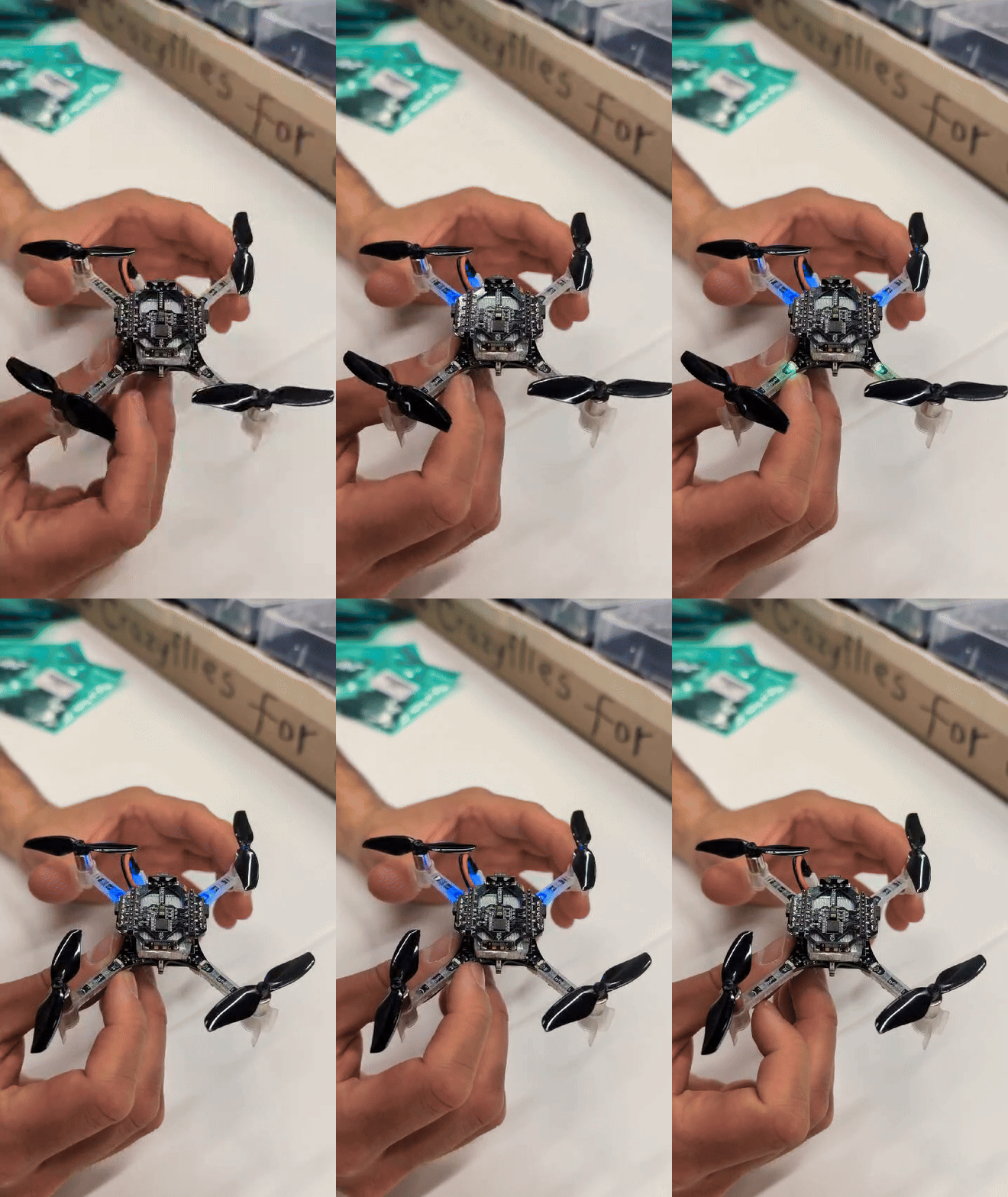
Before powering on the drone, ensure that the multi-ranger and flow decks are mounted correctly, with the forward arrows aligned with the antenna on the Crazyflie body, as shown in the left animation. To mount a new battery, follow the steps shown in the right animation. Note that there is a small power button located in front of the quadrotor that can be used to restart the drone if needed.
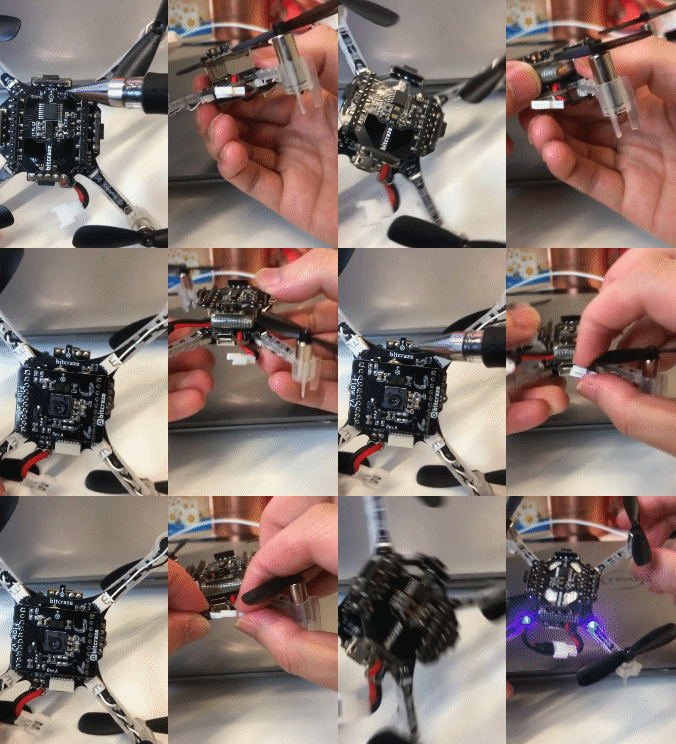
To replace the propellers, make sure to identify the correct type of propeller. Look for the arrows on the drone arm near the motors. Arrows with a clockwise direction indicate Type A propellers, while arrows with a counterclockwise direction indicate Type B propellers.
Onboard LEDs indicate drone states such as low power, self-test fail, etc. Refer to bitcraze page.
If you believe that your motors do not work correctly or you believe that your electronics are damaged, consult the console debugging tool to obtain debugging information and show it to one of the assistants.
Software installation
For developing the code for the Crazyflie, you will first need to install Python 3.8+ if you don’t have it yet. Then, you can clone and install the Crazyflie Python Library, to communicate with and control the Crazyflie.
For both Ubuntu and Windows, you can install the library by running following commands in your terminal:
git clone https://github.com/bitcraze/crazyflie-lib-python.git
cd crazyflie-lib-python
pip3 install -e .
Possible installation issues: 1. In Windows, if pip3 command is not found, then you need to use pip instead; 2. Useful links to Python and pip issues on Windows.
To connect to the drone and visualize its measurements, you can install the Crazyflie client. To do this, follow the instructions under the section “Installing from source” on the site: links. If there are issue with launching the crazyflie client, install both the crazyflie-lib and crazyflie-client it in a new conda / virtual environment.
The next step is to configure the radio driver:
Ubuntu: Look at the usb permission instructions to setup udev on linux.
Windows: Look at the Zadig crazyradio instructions to install crazyradio on Windows
Change radio address
Each drone has a unique address for communication between your laptop and the drone. Crazyflie address = 0xE7E7E7E7XX (XX is your team number such as 01, 02, …, 10, 11, …, 16). Radio channel = 10 * (group_number % 10), such as (10, 20, …, 100, 10, …, 60). When developing your algorithm or running the following examples, be sure to update the uri in your code to reflect the correct address and radio channel for your team.
For example, ‘uri = uri_helper.uri_from_env(default=’radio://0/10/2M/E7E7E7E701’)’ for group 1.
Operating the drone using AI deck
Drones are equipped with an AI deck, which allows you to receive visual information from the drone and communicate with it over a WiFi connection. You can run your own algorithms on your computer and send commands to the drone via this connection.
All drones are preconfigured to create a WiFi access point with the name “crazyflie_XX” (XX is your group number) and password “epfl_lis_XX”. To connect to the AI deck, connect your computer to the WiFi network “crazyflie_XX” using the corresponding password.
To familiarise yourself with the AI deck, you can run an example script that provides an FPV video stream from the drone and allows you to control the drone using the keyboard. The script runs on your computer and communicates with the drone over WiFi:
Arrow keys: forward, backward, left, right
W / S: increase / decrease altitude
A / D: rotate left / right
Space: emergency stop
You can find this example in the crazyflie_fpv_example file. This code uses the send_hover_setpoint function, where the height is sent as an absolute setpoint (intended to represent the distance to the surface under the Crazyflie), while x and y are given as velocity commands in body-fixed coordinates. Other control modes are also available, such as send_position_setpoint, where the position is specified as absolute world-frame x, y, z coordinates (in meters), and the yaw corresponds to an absolute orientation. For more details, refer to the Crazyflie documentation on the commander class.
Note:
You will need to install the Crazyflie Python Library first.
Make sure you are connected to the drone’s WiFi network before running the script.
Lighthouse positioning system information
The Lighthouse positioning system is a motion capture system that uses infrared light to track the 3D position of the drone. The positioning accuracy is typically lower than 1 cm.
To set it up and connect it with your Crazyflie, follow the Lighthouse instructions in the section “Preparing the System”. It is sensible to perform the calibration steps given in this section at the start of every new session that that you have booked, as the stations might still slightly move after another group has used the setup.
Please DO NOT INTENTIONALLY MOVE the base stations and DO NOT MODIFY the Base station software settings. You must not perform any of the steps under “Preparing the base stations”, this is already done for you.
Sensor information and readout
The Crazyflie drone performs sensor fusion from all the onboard sensors and the Lighthouse system to obtain the optimal state estimate using an Extended Kalman Filter (EKF). For background information on the measurement models and the state estimation pipeline, refer to this link.
In the Crazyflie software you may access the state estimates from these logging variables.
Example - log
Now you can test the communication with the drone by downloading and running this log example:
# -*- coding: utf-8 -*-
#
#     ||          ____  _ __
#  +------+      / __ )(_) /_______________ _____  ___
#  | 0xBC |     / __  / / __/ ___/ ___/ __ `/_  / / _ \
#  +------+    / /_/ / / /_/ /__/ /  / /_/ / / /_/  __/
#   ||  ||    /_____/_/\__/\___/_/   \__,_/ /___/\___/
#
#  Copyright (C) 2014 Bitcraze AB
#
#  Crazyflie Nano Quadcopter Client
#
#  This program is free software; you can redistribute it and/or
#  modify it under the terms of the GNU General Public License
#  as published by the Free Software Foundation; either version 2
#  of the License, or (at your option) any later version.
#
#  This program is distributed in the hope that it will be useful,
#  but WITHOUT ANY WARRANTY; without even the implied warranty of
#  MERCHANTABILITY or FITNESS FOR A PARTICULAR PURPOSE.  See the
#  GNU General Public License for more details.
# You should have received a copy of the GNU General Public License
# along with this program. If not, see <https://www.gnu.org/licenses/>.
"""
Simple example that connects to the first Crazyflie found, logs the Stabilizer
and prints it to the console. After 10s the application disconnects and exits.
"""
import logging
import time
from threading import Timer

import cflib.crtp  # noqa
from cflib.crazyflie import Crazyflie
from cflib.crazyflie.log import LogConfig
from cflib.utils import uri_helper

# TODO: CHANGE THIS URI TO YOUR CRAZYFLIE & YOUR RADIO CHANNEL
uri = uri_helper.uri_from_env(default='radio://0/100/2M/E7E7E7E720')

# Only output errors from the logging framework
logging.basicConfig(level=logging.ERROR)


class LoggingExample:
    """
    Simple logging example class that logs the Stabilizer from a supplied
    link uri and disconnects after 5s.
    """

    def __init__(self, link_uri):
        """ Initialize and run the example with the specified link_uri """

        self._cf = Crazyflie(rw_cache='./cache')

        # Connect some callbacks from the Crazyflie API
        self._cf.connected.add_callback(self._connected)
        self._cf.disconnected.add_callback(self._disconnected)
        self._cf.connection_failed.add_callback(self._connection_failed)
        self._cf.connection_lost.add_callback(self._connection_lost)

        print('Connecting to %s' % link_uri)

        # Try to connect to the Crazyflie
        self._cf.open_link(link_uri)

        # Variable used to keep main loop occupied until disconnect
        self.is_connected = True

    def _connected(self, link_uri):
        """ This callback is called form the Crazyflie API when a Crazyflie
        has been connected and the TOCs have been downloaded."""
        print('Connected to %s' % link_uri)

        # The definition of the logconfig can be made before connecting
        self._lg_stab = LogConfig(name='Stabilizer', period_in_ms=50)
        self._lg_stab.add_variable('stateEstimate.x', 'float')
        self._lg_stab.add_variable('stateEstimate.y', 'float')
        self._lg_stab.add_variable('stateEstimate.z', 'float')
        self._lg_stab.add_variable('stabilizer.yaw', 'float')

        # The fetch-as argument can be set to FP16 to save space in the log packet
        # self._lg_stab.add_variable('pm.vbat', 'FP16')

        # Adding the configuration cannot be done until a Crazyflie is
        # connected, since we need to check that the variables we
        # would like to log are in the TOC.
        try:
            self._cf.log.add_config(self._lg_stab)
            # This callback will receive the data
            self._lg_stab.data_received_cb.add_callback(self._stab_log_data)
            # This callback will be called on errors
            self._lg_stab.error_cb.add_callback(self._stab_log_error)
            # Start the logging
            self._lg_stab.start()
        except KeyError as e:
            print('Could not start log configuration,'
                  '{} not found in TOC'.format(str(e)))
        except AttributeError:
            print('Could not add Stabilizer log config, bad configuration.')

        # Start a timer to disconnect in 10s
        t = Timer(10, self._cf.close_link)
        t.start()

    def _stab_log_error(self, logconf, msg):
        """Callback from the log API when an error occurs"""
        print('Error when logging %s: %s' % (logconf.name, msg))

    def _stab_log_data(self, timestamp, data, logconf):
        """Callback from a the log API when data arrives"""
        print(f'[{timestamp}][{logconf.name}]: ', end='')
        for name, value in data.items():
            print(f'{name}: {value:3.3f} ', end='')
        print()

    def _connection_failed(self, link_uri, msg):
        """Callback when connection initial connection fails (i.e no Crazyflie
        at the specified address)"""
        print('Connection to %s failed: %s' % (link_uri, msg))
        self.is_connected = False

    def _connection_lost(self, link_uri, msg):
        """Callback when disconnected after a connection has been made (i.e
        Crazyflie moves out of range)"""
        print('Connection to %s lost: %s' % (link_uri, msg))

    def _disconnected(self, link_uri):
        """Callback when the Crazyflie is disconnected (called in all cases)"""
        print('Disconnected from %s' % link_uri)
        self.is_connected = False


if __name__ == '__main__':
    # Initialize the low-level drivers
    cflib.crtp.init_drivers()

    le = LoggingExample(uri)

    # The Crazyflie lib doesn't contain anything to keep the application alive,
    # so this is where your application should do something. In our case we
    # are just waiting until we are disconnected.
    while le.is_connected:
        time.sleep(1)
For this example you can put the drone on desk as there is no control. If the library and radio driver is configured correctly, you should see sensor data printed in your terminal when running this example (remember changing the uri). Try moving your hand closer and farther away from the multi-ranger sensors and observe the sensor data change.
Example - log_and_control
This example code will control the drone to fly a figure-eight trajectory, while also logging all sensor data at the same time.
# -*- coding: utf-8 -*-
#
#     ||          ____  _ __
#  +------+      / __ )(_) /_______________ _____  ___
#  | 0xBC |     / __  / / __/ ___/ ___/ __ `/_  / / _ \
#  +------+    / /_/ / / /_/ /__/ /  / /_/ / / /_/  __/
#   ||  ||    /_____/_/\__/\___/_/   \__,_/ /___/\___/
#
#  Copyright (C) 2014 Bitcraze AB
#
#  Crazyflie Nano Quadcopter Client
#
#  This program is free software; you can redistribute it and/or
#  modify it under the terms of the GNU General Public License
#  as published by the Free Software Foundation; either version 2
#  of the License, or (at your option) any later version.
#
#  This program is distributed in the hope that it will be useful,
#  but WITHOUT ANY WARRANTY; without even the implied warranty of
#  MERCHANTABILITY or FITNESS FOR A PARTICULAR PURPOSE.  See the
#  GNU General Public License for more details.
# You should have received a copy of the GNU General Public License
# along with this program. If not, see <https://www.gnu.org/licenses/>.
"""
Simple example that connects to the first Crazyflie found, logs the Stabilizer
and prints it to the console.

The Crazyflie is controlled using the commander interface

Press q to Kill the drone in case of emergency

After 50s the application disconnects and exits.
"""
import logging
import time
from threading import Timer
import threading

from pynput import keyboard # Import the keyboard module for key press detection

import cflib.crtp  # noqa
from cflib.crazyflie import Crazyflie
from cflib.crazyflie.log import LogConfig
from cflib.utils import uri_helper

# TODO: CHANGE THIS URI TO YOUR CRAZYFLIE & YOUR RADIO CHANNEL
uri = uri_helper.uri_from_env(default='radio://0/100/2M/E7E7E7E720')

# Only output errors from the logging framework
logging.basicConfig(level=logging.ERROR)


class LoggingExample:
    """
    Simple logging example class that logs the Stabilizer from a supplied
    link uri and disconnects after 10s.
    """

    def __init__(self, link_uri):
        """ Initialize and run the example with the specified link_uri """

        self._cf = Crazyflie(rw_cache='./cache')

        # Connect some callbacks from the Crazyflie API
        self._cf.connected.add_callback(self._connected)
        self._cf.disconnected.add_callback(self._disconnected)
        self._cf.connection_failed.add_callback(self._connection_failed)
        self._cf.connection_lost.add_callback(self._connection_lost)

        print('Connecting to %s' % link_uri)

        # Try to connect to the Crazyflie
        self._cf.open_link(link_uri)

        # Variable used to keep main loop occupied until disconnect
        self.is_connected = True

    def _connected(self, link_uri):
        """ This callback is called form the Crazyflie API when a Crazyflie
        has been connected and the TOCs have been downloaded."""
        print('Connected to %s' % link_uri)

        # The definition of the logconfig can be made before connecting
        self._lg_stab = LogConfig(name='Stabilizer', period_in_ms=50)
        self._lg_stab.add_variable('stateEstimate.x', 'float')
        self._lg_stab.add_variable('stateEstimate.y', 'float')
        self._lg_stab.add_variable('stateEstimate.z', 'float')
        self._lg_stab.add_variable('stabilizer.yaw', 'float')

        # The fetch-as argument can be set to FP16 to save space in the log packet
        # self._lg_stab.add_variable('pm.vbat', 'FP16')

        # Adding the configuration cannot be done until a Crazyflie is
        # connected, since we need to check that the variables we
        # would like to log are in the TOC.
        try:
            self._cf.log.add_config(self._lg_stab)
            # This callback will receive the data
            self._lg_stab.data_received_cb.add_callback(self._stab_log_data)
            # This callback will be called on errors
            self._lg_stab.error_cb.add_callback(self._stab_log_error)
            # Start the logging
            self._lg_stab.start()
        except KeyError as e:
            print('Could not start log configuration,'
                  '{} not found in TOC'.format(str(e)))
        except AttributeError:
            print('Could not add Stabilizer log config, bad configuration.')

        # Start a timer to disconnect in 50s     TODO: CHANGE THIS TO YOUR NEEDS
        t = Timer(50, self._cf.close_link)
        t.start()

    def _stab_log_error(self, logconf, msg):
        """Callback from the log API when an error occurs"""
        print('Error when logging %s: %s' % (logconf.name, msg))

    def _stab_log_data(self, timestamp, data, logconf):
        """Callback from a the log API when data arrives"""

        # Print the data to the console
        # print(f'[{timestamp}][{logconf.name}]: ', end='')
        # for name, value in data.items():
        #     print(f'{name}: {value:3.3f} ', end='')
        # print()

    def _connection_failed(self, link_uri, msg):
        """Callback when connection initial connection fails (i.e no Crazyflie
        at the specified address)"""
        print('Connection to %s failed: %s' % (link_uri, msg))
        self.is_connected = False

    def _connection_lost(self, link_uri, msg):
        """Callback when disconnected after a connection has been made (i.e
        Crazyflie moves out of range)"""
        print('Connection to %s lost: %s' % (link_uri, msg))

    def _disconnected(self, link_uri):
        """Callback when the Crazyflie is disconnected (called in all cases)"""
        print('Disconnected from %s' % link_uri)
        self.is_connected = False


# Define your custom callback function
def emergency_stop_callback(cf):
    def on_press(key):
        try:
            if key.char == 'q':  # Check if the "space" key is pressed
                print("Emergency stop triggered!")
                cf.commander.send_stop_setpoint()  # Stop the Crazyflie
                cf.close_link()  # Close the link to the Crazyflie
                return False     # Stop the listener
        except AttributeError:
            pass

    # Start listening for key presses
    with keyboard.Listener(on_press=on_press) as listener:
        listener.join()

if __name__ == '__main__':
    # Initialize the low-level drivers
    cflib.crtp.init_drivers()

    le = LoggingExample(uri)
    cf = le._cf

    cf.param.set_value('kalman.resetEstimation', '1')
    time.sleep(0.1)
    cf.param.set_value('kalman.resetEstimation', '0')
    time.sleep(2)

    # Replace the thread creation with the updated function
    emergency_stop_thread = threading.Thread(target=emergency_stop_callback, args=(cf,))
    emergency_stop_thread.start()

    # TODO : CHANGE THIS TO YOUR NEEDS
    print("Starting control")
    while le.is_connected:
        time.sleep(0.01)

        # Take-off
        for y in range(10):
            cf.commander.send_hover_setpoint(0, 0, 0, y / 25)
            time.sleep(0.1)
        for _ in range(20):
            cf.commander.send_hover_setpoint(0, 0, 0, 0.4)
            time.sleep(0.1)

        # Move
        for _ in range(50):
            cf.commander.send_hover_setpoint(0, 0, 0, 0.4)
            time.sleep(0.1)
        for _ in range(50):
            cf.commander.send_hover_setpoint(0, 0, 0, 0.4)
            time.sleep(0.1)

        # Land
        for _ in range(20):
            cf.commander.send_hover_setpoint(0, 0, 0, 0.4)
            time.sleep(0.1)
        for y in range(10):
            cf.commander.send_hover_setpoint(0, 0, 0, (10 - y) / 25)
            time.sleep(0.1)

        cf.commander.send_stop_setpoint()
        break
Please ensure that you place the drone on the ground before testing this example, as the drone is programmed to take off and fly. Additionally, it is recommended to take off from a white part of the ground for best performance.
These two examples give you a sufficient framework to finish the task. Additional examples can be found at Crazyflie Python library examples.